This project replaced an unmanaged, plug-and-play home network — the original setup installed when the home was built around 2018 — with a fully segmented, professionally architected Unifi network. The core goal was risk reduction: ensuring that no single compromised or unauthorized device, whether a smart-home gadget, a security camera, or a guest's phone, could reach any other system on the network. The upgrade also created a safe, fully isolated environment for hands-on security testing, allowing vulnerability scanning tools to be run against real targets without any risk to production devices. The work spanned six phases — network design, wireless architecture, segmentation and isolation, lab validation, real-world security monitoring, and unexpected troubleshooting — and took longer than initially planned due to a handful of hardware and software issues encountered along the way, each resolved and documented below.
Network Design
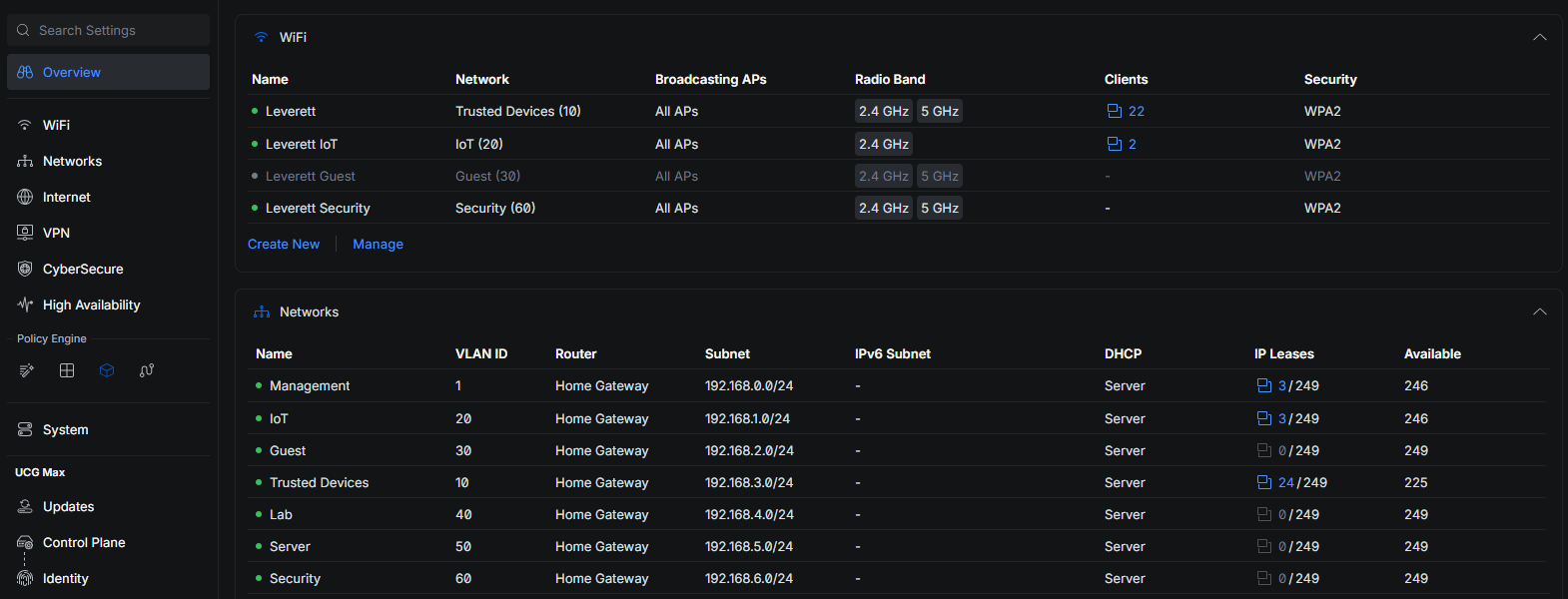
The foundation of this upgrade is network segmentation: dividing the network into isolated zones so that a problem in one area cannot spread to another. Seven VLANs enforce default-deny segmentation: Management, Trusted, IoT, Guest, Lab, Server, and a dedicated Security network for cameras — kept separate from general IoT for tighter isolation on higher-value devices. Trusted is the only network with broad reach; everything else is isolated by default. At this stage, no firewall rule has been created to allow devices on the Trusted VLAN to access any other part of the network. This was done by design — no device currently on the network outside of the Trusted VLAN needs or requires such access, since each is managed through its own cloud service login. A future firewall rule is planned for when a TrueNAS server is installed
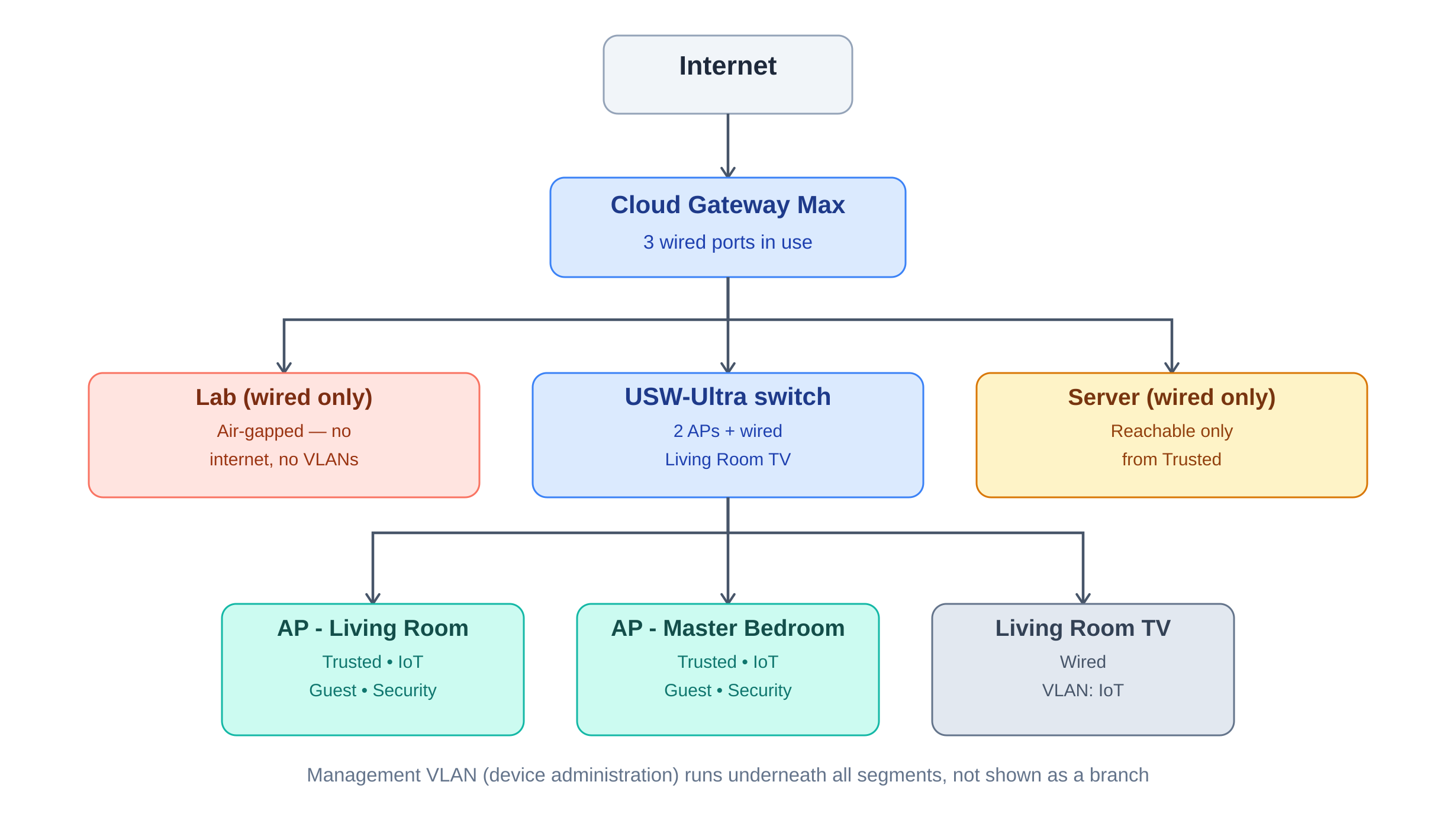
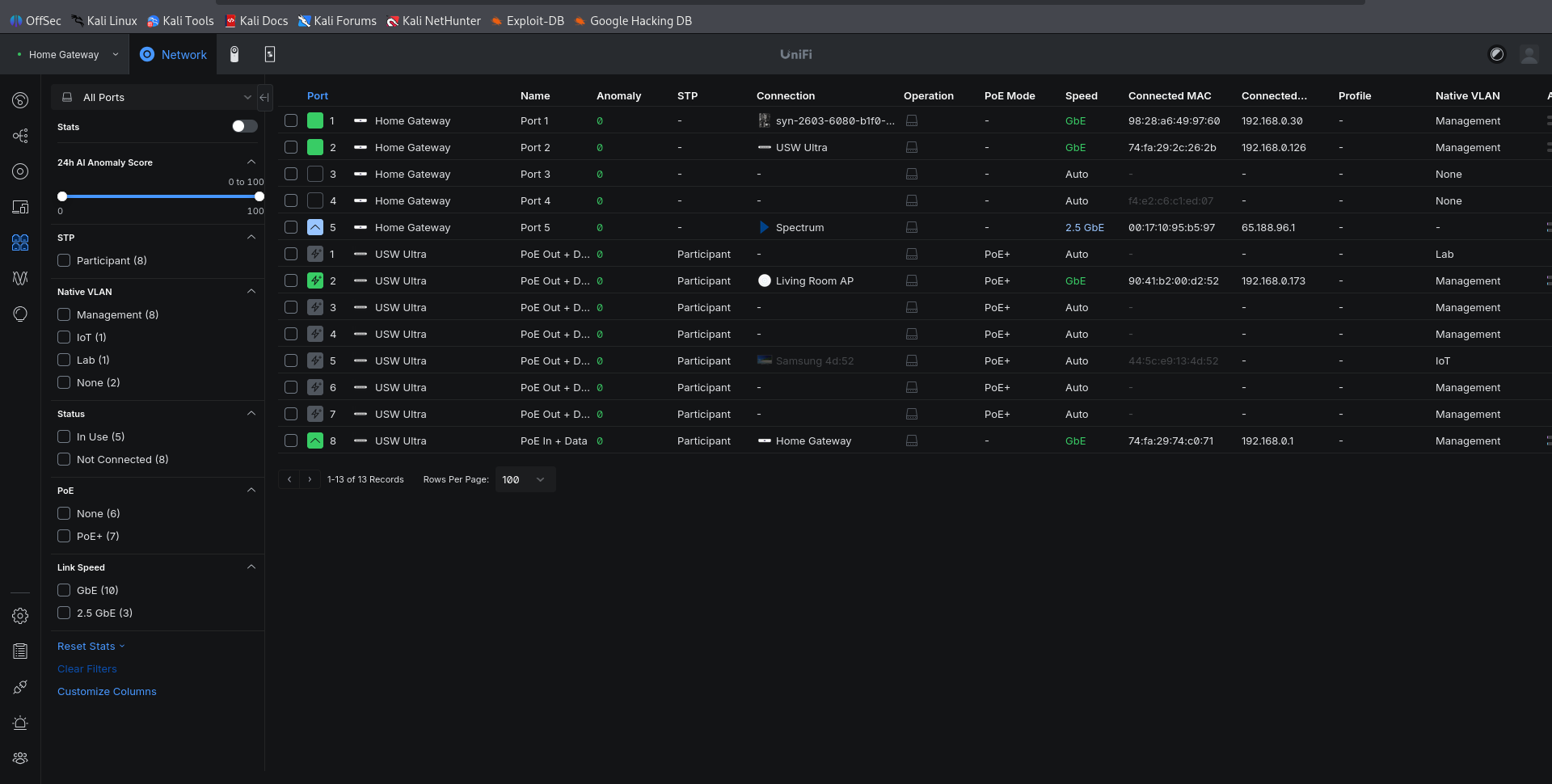
on the network. The diagram reflects the complete, three-port target design for the gateway — including that future server — even though only two of the three ports are active today: the USW-Ultra switch and the dedicated Lab VLAN. The third port is reserved and will be brought online once the server itself is built. The switch, which has eight available ports, currently has three devices connected: two access points (APs) and the living room TV. One AP is located in the living room and the other in the master bedroom on the second floor. Both APs are set to a moderate transmit power to reduce interference between them without sacrificing coverage, and heavy network traffic is not expected to be affected by this setting. Each AP also supports handoff suggestions, prompting a device with a weak signal on one AP to switch to the other for better performance. Also connected to the switch is the living room TV, which is segmented onto the IoT VLAN, separate from Trusted devices. The same isolation principle will apply to the future server and the dedicated Lab once both are fully built out. Each VLAN is isolated from the others, preventing unauthorized lateral movement. The Lab VLAN goes a step further: in addition to being isolated from every other VLAN, it also has no internet access at all, unlike the rest of the network.
Wireless Architecture
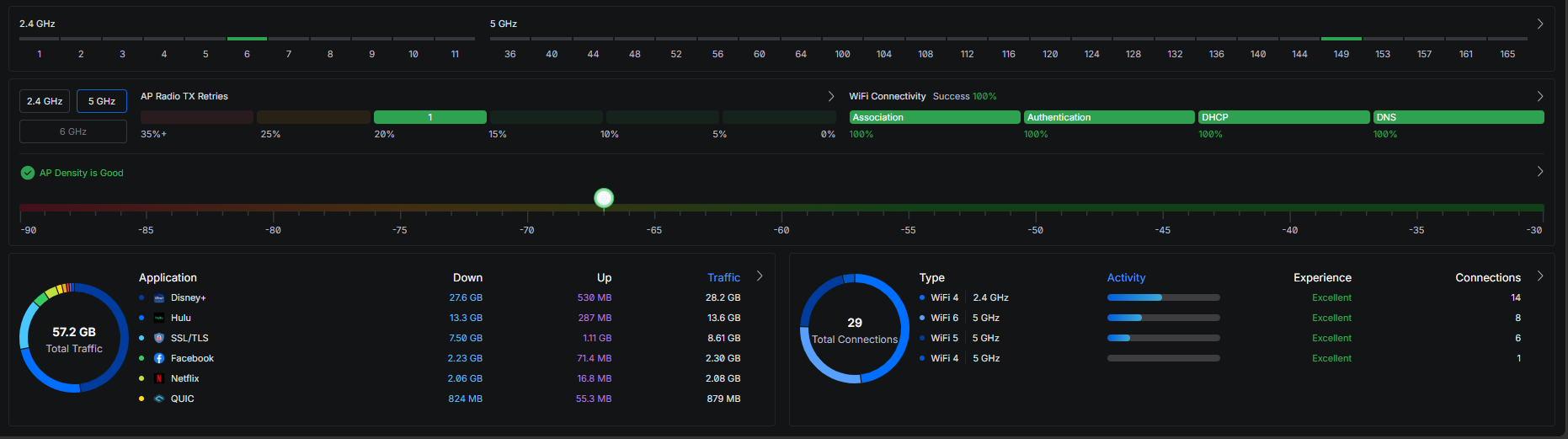
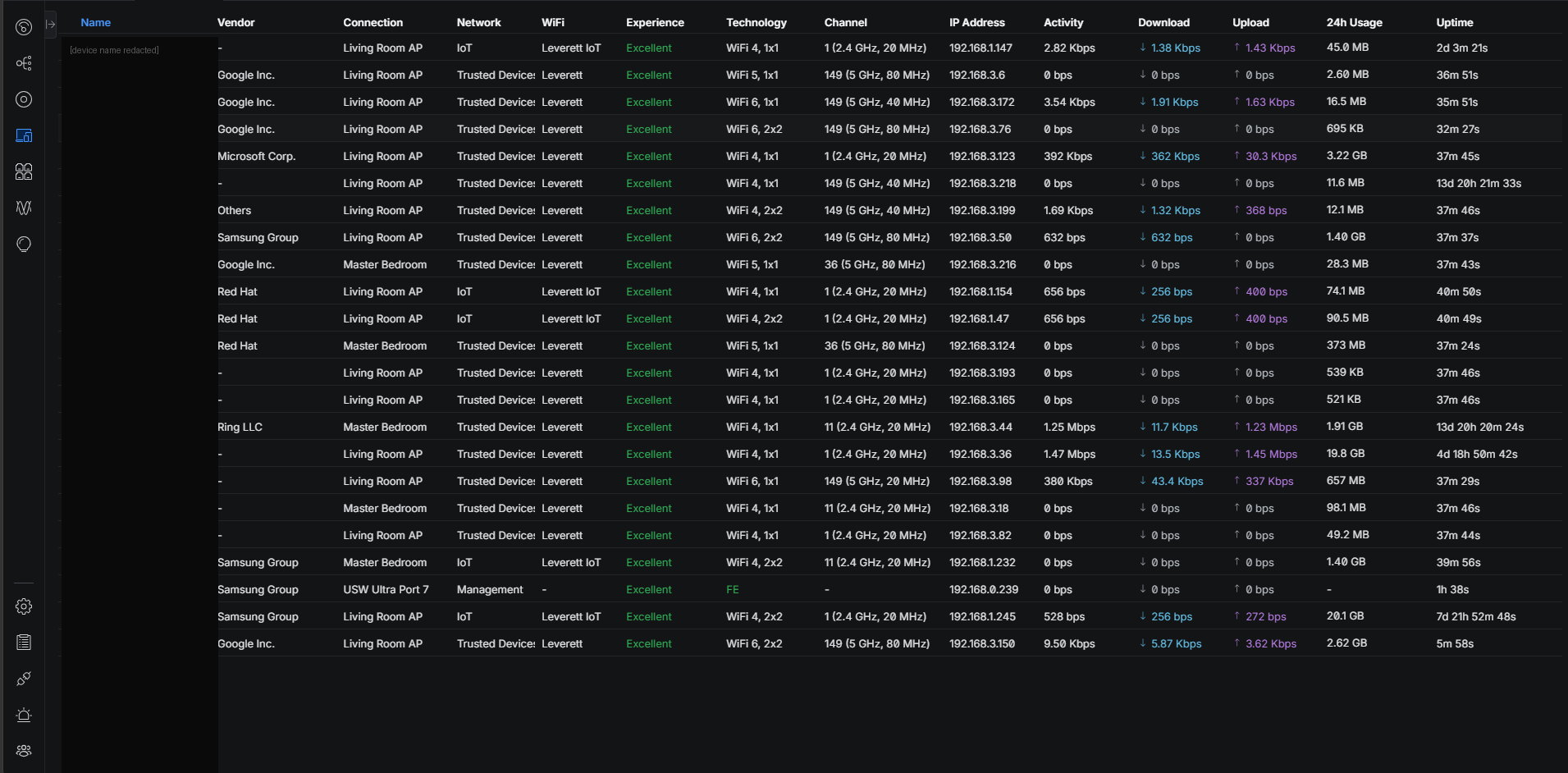
Reliable, seamless wireless coverage was a core requirement, not an afterthought. Two APs broadcast matching SSIDs on non-overlapping channels, with Fast Roaming (802.11r) and Handoff Suggestions (802.11v) enabled for seamless handoff between them. This was verified during regular use, prior to any deliberate testing — multiple clients switched APs automatically, including mid-use and unprompted, as soon as the settings went live. At the time the screenshots below were taken, 17 clients were connected across both APs; once the roaming configuration went live.
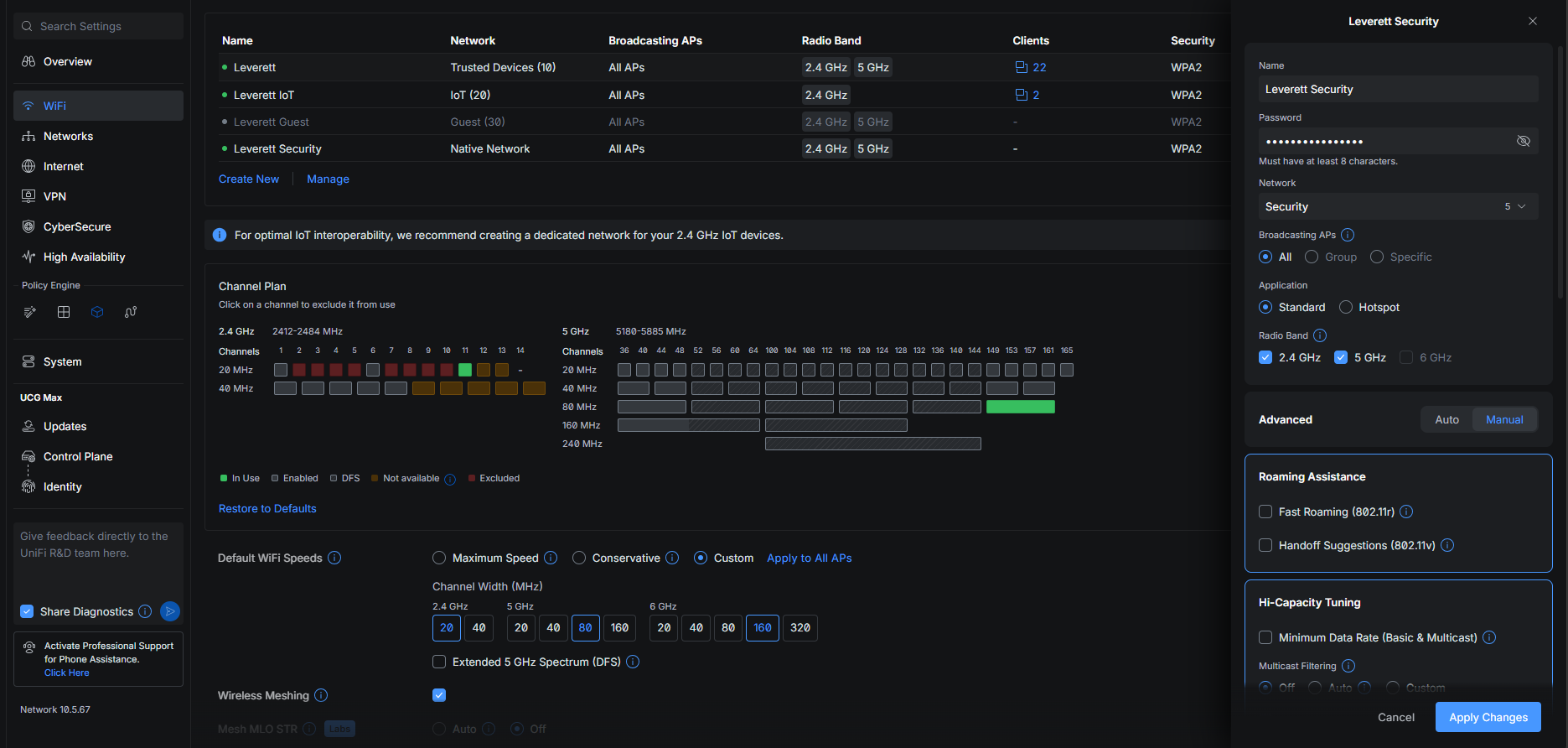
5 clients switched automatically without any action taken. Separately, while verifying AP channel assignments, one user's device — connected to the Trusted VLAN — was observed switching from the Living Room AP to the Master Bedroom AP as they walked outside, and switching back (though with a slight delay) once they returned. Seven clients are connected to the IoT VLAN, isolated from the rest of the network, while any home security device connects through the dedicated Security network. Only one device is permitted on the Security VLAN, allow-listed by MAC address, minimizing the attack surface even if the SSID password itself were ever compromised. A guest network exists but is intentionally left unbroadcast, since no guests are expected in the near future — keeping it fully configured means it can be switched on instantly whenever needed, without building it from scratch at that time.
Segmentation & Isolation
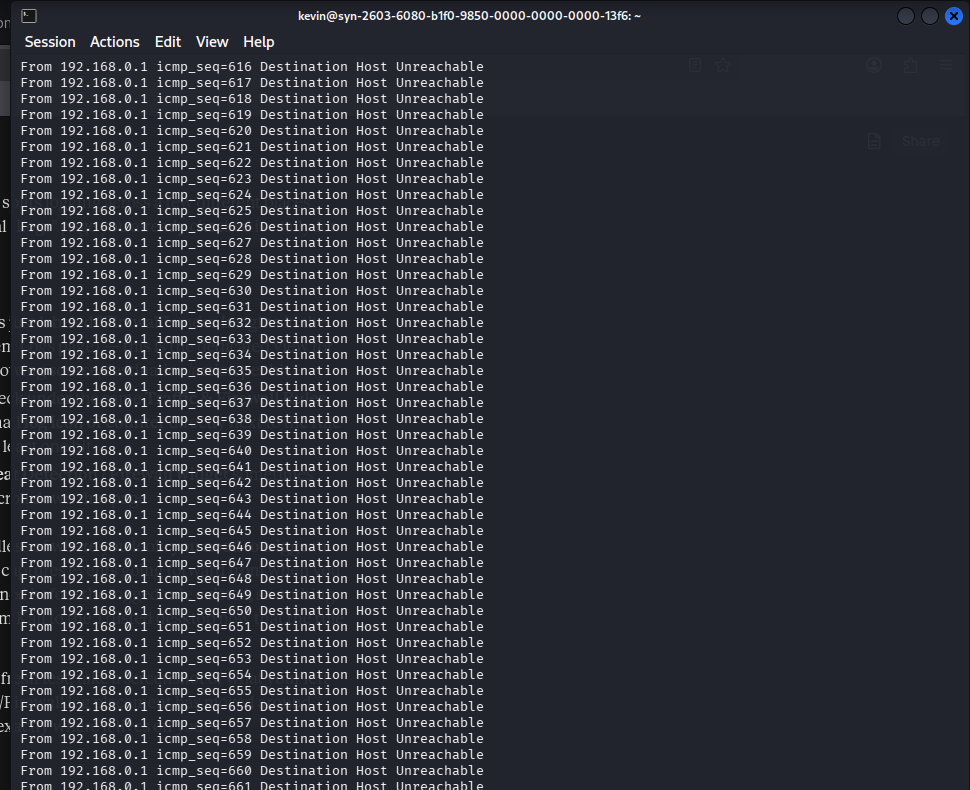
The value of segmentation depends on it actually holding under real conditions, not just existing on paper. Isolation between VLANs is enforced at the routing layer itself, rather than relying solely on firewall rules to drop traffic after it has already been routed. This was confirmed directly during testing: an attempt to reach a Trusted-VLAN device from the isolated Lab VLAN returned a "Destination Host Unreachable" response from the gateway itself, meaning no route between the two networks exists at all — a stronger guarantee than a rule-based deny, since it removes the possibility of a misconfigured or bypassed rule ever letting that traffic through.
Lab Validation
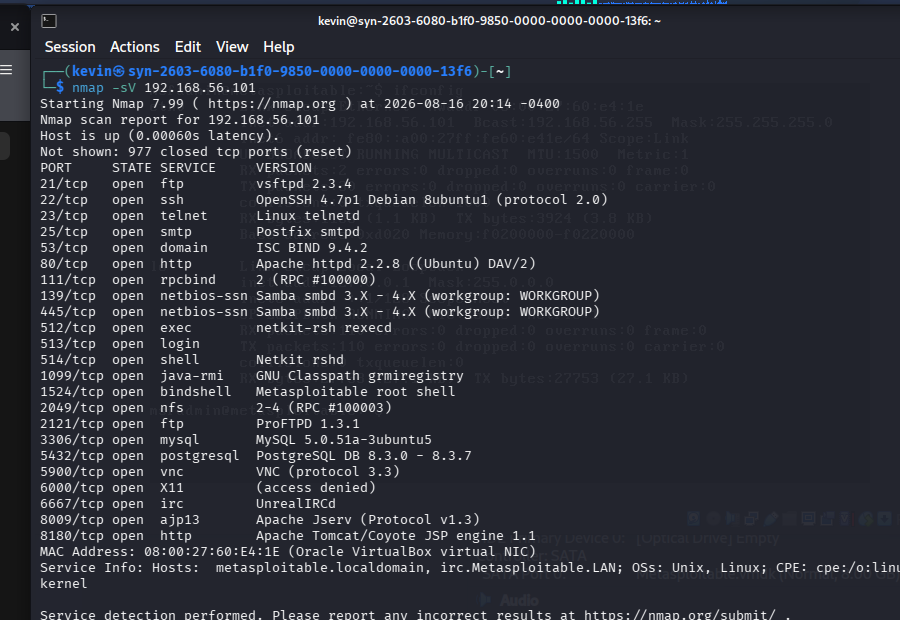
To validate the Lab VLAN's isolation under real conditions, a Kali Linux machine connected to the Lab network hosted an intentionally vulnerable virtual target, Metasploitable2, over an internal-only VirtualBox network — keeping the target invisible to the physical network entirely. An Nmap scan against the target enumerated more than 20 open services, including several long-documented intentional backdoors, confirming the scanning workflow performed as expected. Containment was then verified by attempting to reach a Trusted-VLAN device from the Lab VLAN; the attempt failed outright, consistent with the routing-level isolation described above.
Real-World Security Monitoring
During normal operation, the network's connectivity logs surfaced a device making sustained, rapid WPA authentication attempts against the primary SSID — dozens of attempts within a few hours, each only seconds apart. A MAC address lookup identified the device as built around a module from Sichuan AI-Link Technology, a manufacturer whose chips are used across many generic, often unbranded IoT products, which made the device itself difficult to positively identify. It was temporarily blocked at the SSID level while the pattern was investigated further. Reviewing the full connectivity history showed the attempts had actually been occurring for close to 24 hours with no change in behavior or escalation — a pattern more consistent with a device retrying a stale saved password than an active credential attack. The block was lifted while the search for the specific device continues. This reflects a broader principle applied throughout the project: distinguishing a genuine threat from routine noise, rather than reacting to every anomaly as an intrusion.
Troubleshooting
Two issues surfaced during the build that required real diagnostic work rather than simply following documentation. Bringing the second access point online was delayed for several days by an intermittent connection that traced back to a bad female port connector, further complicated by that cable run being spliced into another, unknown length of cable already run through the house — likely original wiring from the home's construction. Separately, setting up the isolated Lab VLAN required running VirtualBox on Kali Linux with host-only networking, which initially failed due to a kernel and DKMS module mismatch common on rolling-release systems — the running kernel had outpaced the header packages available in the repositories. Resolving it required waiting for a matching headers release, rebuilding the VirtualBox kernel modules, and rebooting into the correct kernel before the host-only network driver would load.
Next Steps
Two items remain to close this project out fully. First, once the TrueNAS server is installed on its reserved Server VLAN, a scoped firewall rule will be added to allow the Trusted VLAN to reach it — the only planned exception to the network's default-deny posture. Second, a 3D-printed rack (black body, white labels, black text) is in development to complete physical cable and device management, ensuring the physical build is as traceable and documented as the logical design. This entry will be updated with photos once that work is complete.
Skills demonstrated: network segmentation and least-privilege firewall design, wireless network architecture, VM-level network isolation, vulnerability scanning and validation, log-based security investigation, and physical and technical infrastructure troubleshooting.